
  1. Home
  2. Smart Home
  3. Best Ofs

Digital Trends may earn a commission when you buy through links on our site. Why trust us?

The best HomeKit smart blinds of 2023

Add as a preferred source on Google
Fyrtur blackout blinds in a bedroom.
Ikea

While HomeKit may lag behind the competition in other smart home categories, Apple's platform supports a surprising number of smart blinds and smart shades. These nifty gadgets let you open and close them using either your HomeKit app or voice commands, while also allowing you to program in daily schedules or operate them remotely.

Smart blinds are a great way to upgrade your smart home – and if you're running HomeKit, there are a ton of products to consider. To help you with your search, here's a look at the best HomeKit smart blinds available today.
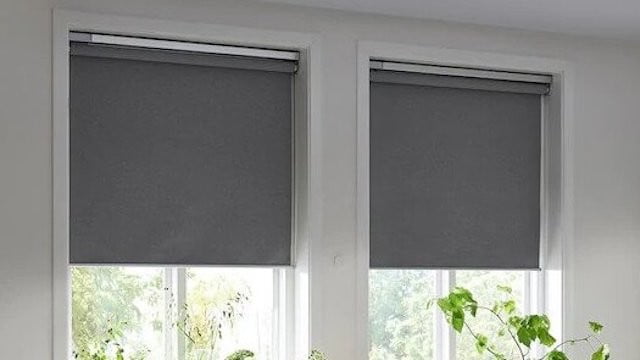
Graywind Roller Shades
Graywind Motorized Shades
Jump to details
Eve MotionBlinds Upgrade Kit for Roller Blinds
Eve MotionBlinds Upgrade Kit
Jump to details
SmartWings Motorized Zebra Shades
Jump to details
Recommended Videos
Fyrtur blackout blinds in a bedroom.
Ikea

Ikea Fyrtur

Pros
  • Premium polyester material
  • Cordless design
  • Simple installation process
Cons
  • Limited selection of styles
  • Requires a hub to use HomeKit

Though you’ll need the Dirigera hub to get it synced properly with HomeKit, that’s a minor inconvenience for an otherwise well-rounded package. Ikea is known for its sleek designs and reasonable prices – and that’s once again the case with the Fyrtur roller blinds. Available in a variety of sizes and built with polyester for a durable, wrinkle-resistant look, few smart blinds are as stylish as this. They’re also cordless (which is great for homes with kids or pets) and feature a rechargeable battery that makes it easy to keep them charged and ready for action. Ikea ensured the installation process is straightforward, so even if you have minimal DIY skills, you should be able to get your Fyrtur blinds up and running without much hassle.

Ikea Fyrtur
Ikea Fyrtur
A person closing the Graywind shades.
Image used with permission by copyright holder

Graywind Motorized Shades

Pros
  • Tons of customization options
  • Robust companion app
  • Additional support for Amazon Alexa
Cons
  • Only block 60% of light

Available in a variety of styles and sizes, the Graywind Motorized Light Filtering Shades are a great option for HomeKit users. Keep in mind that these aren’t blackout shades – they filter out 60% of light – so they aren’t ideal for home theaters or bedrooms, but if you want something that diffuses light and gives you a bit of added privacy, it’s hard to beat these sleek shades. If you decide you don’t want to control them with HomeKit, you’ll be glad to know that they offer support for Amazon Alexa and features their own companion app for added flexibility.

Graywind Roller Shades
Graywind Motorized Shades
Old blinds upgraded with the Eve MotionBlinds kit.
Eve / .

Eve MotionBlinds Upgrade Kit

Pros
  • Allows you to keep your current shades
  • Straightforward installation process
  • Reasonable price
Cons
  • Won't work with all existing shades

Love your current blinds, but wish they were a bit smarter? Consider taking a look at the Eve MotionBlinds Upgrade Kit, which lets you upgrade indoor blinds and adds support for HomeKit. Once you’ve replaced your blinds’ existing tube with the Eve upgrade kit, you’ll be able to control them with Siri, set schedules, and automate just about everything about their performance. Keep in mind that this won’t work with all existing products (there are some strict requirements your blinds will have to meet), but be sure to check out this upgrade kit before springing for a whole new set of blinds.

Eve MotionBlinds Upgrade Kit for Roller Blinds
Eve MotionBlinds Upgrade Kit
The SmartWings blinds installed in a living room.
SmartWings

SmartWings Motorized Zebra Shades

Pros
  • Unique "zebra" design
  • Multiple color options
  • Supports additional smart home platforms
Cons
  • Zebra design won't be to everyone's liking

The SmartWings Motorized Zebra Shades might be the most unique product on this list, thanks to their dual-layer design that lets you switch between sheer and privacy modes. This gives them a bit more functionality than other products, as they offer simple light filtering in one mode and 50% blackout in another. You’ll also benefit from a free two-year warranty and an easy installation process. HomeKit is fully supported (as are Alexa and Google Home), and if you’re not a fan of this Zebra design, be sure to check out all the other SmartWing blinds that play nicely with Apple’s smart home platform.

SmartWings Motorized Zebra Shades
Jon Bitner
Former Digital Trends Contributor

Jon Bitner is a writer covering consumer electronics, technology, and gaming. His work has been published on various websites beyond Digital Trends, including The Wall Street Journal, Metacritic, GameSpot, and Slickdeals. He holds a degree in Biology and previously worked as a Medical Editor.

When not playing video games, he can be found running, reading, or checking out the latest series on Netflix.

Apple is reportedly looking to expand its smart home lineup with smart displays, cameras, and updated HomePods
Apple's smart home roadmap reportedly includes new displays, cameras and HomePods
Apple HomePod with Apple iPhone

Apple appears to be preparing a much broader push into smart-home hardware, with several new products in development as the company looks to expand beyond the HomePod mini and Apple TV, according to a 9To5Mac report.

The roadmap includes refreshed versions of both existing products, a new smart-home hub with a display, a larger HomePod update, and eventually Apple's first dedicated smart-home security devices. The information comes from recent reporting summarized by 9to5Mac, which notes that Siri's long-awaited AI upgrades could remove one of the obstacles that has held back new Home products.

Read more
Lutron just made it easier to control your smart home without touching your phone
Smart home voice control usually means buying yet another speaker or hub. Lutron and Sonos found a simpler fix: use the speaker you probably already own.
Electronics, Speaker, Text

If you’ve lost count of how many remotes and apps you juggle between just to dim a light or skip a song, I have something for you. Lutron just gave its Caseta smart home lineup a new shortcut, letting you control lights, shades, and Sonos playback with your voice alone.

For anyone who is catching up, Caseta is Lutron's do-it-yourself smart lighting system. It’s built around a small hub that basically talks to switches, dimmers, and plugs over a radio signal (instead of Wi-Fi), making it easier to manage the entire setup. While the company has worked alongside Sonos for a while, voice control was the one piece still missing from that partnership. That changes now.

Read more
The best smart home gym equipment
Find the connected fitness equipment that's worth your money.
Woman boxing with FightCamp.

The average workout doesn't begin with your first rep anymore. It begins with the data you've already collected. Smartwatches track your sleep and heart rate, smart rings measure recovery, and some fitness enthusiasts even use continuous glucose monitors to better understand how their bodies respond to training and nutrition. Smart home gym equipment builds on that foundation, combining connected hardware with AI-powered coaching, adaptive resistance, and long-term progress tracking to turn health insights into smarter workouts.

Smart fitness has also grown well beyond streaming workout classes. The latest machines can automatically adjust resistance as you get stronger, analyze your performance over time, and sync with the health devices you already use. Some even use AI to recommend workouts based on your goals and training history, making every session feel more personalized. If you're still deciding whether investing in connected fitness makes sense for your lifestyle, check out our guide on whether a smart home gym is worth it.

Read more