With the re-release of Super Mario 3D World + Bowser’s Fury for Nintendo Switch, players have gotten the chance to revisit (or try for the first time) one of the best Wii U games out there. Super Mario 3D World is one of the most unique Mario games, particularly due to its 2.5D camera, which tends to shift depending on where you are in a particular level. This game — like many Super Mario titles — has a lot to unlock, from the green stars across each level to an additional character, unlimited lives, and more.
Since there’s so much to do in this game, you might be overwhelmed when trying to unlock everything it has to offer. Fortunately, we’re here to help. In this guide, we’ll show you how to unlock the additional Rosalina character, unlimited lives, and the secret Luigi Bros. game.
Recommended reading:
- Super Mario 3D World beginner’s guide
- Super Mario 3D World + Bowser’s Fury review: A joyful celebration
- All of the secret exits and warp zones in Super Mario 3D World
How to unlock Rosalina
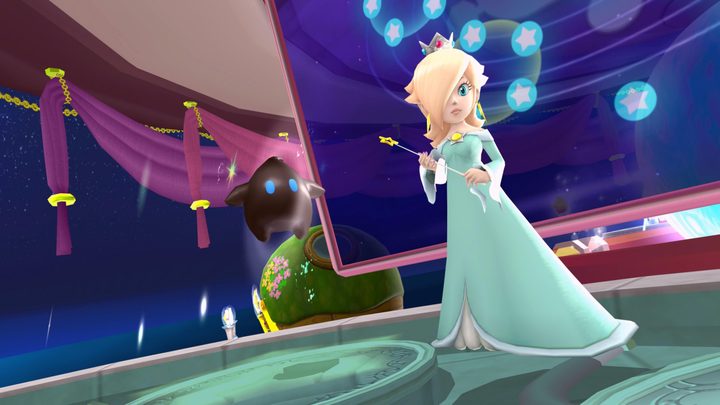
First up, we’ll walk you through unlocking Rosalina in Super Mario 3D World. She first appeared in Super Mario Galaxy and is a playable character in Mario’s latest adventure. By default, you can play as Mario, Luigi, Toad, and Princess Peach, but Rosalina is an additional fifth character that can be unlocked if you meet certain requirements.
First, you need to complete the game by finishing World Castle and World Bowser. You need to defeat Bowser in his final form and reach the game’s final credits. After you do, you’ll come to the game’s main home screen. Boot back into the game and return to the first world.
Head over to World 1-1, but don’t actually start it. Instead, look to the north and you’ll see a tall structure surrounded by fairies (the ones you’ve been rescuing throughout the game). Walk toward it and you’ll get a cutscene, revealing a tall rocket ship. Jump in and it’ll take you to World Star, a secret world that is only available after you’ve completed the game.
Once you beat the first two levels of World Star — Rainbow Run and Super Galaxy — you’ll gain access to Rosalina. In fact, you can see Rosalina waiting for you at the end of Super Galaxy level, indicating that she’ll be ready to unlock. After you complete the level, you’ll have this additional character added to your roster. Simply back out to the main menu and start the game again to select Rosalina.
How to unlock infinite lives
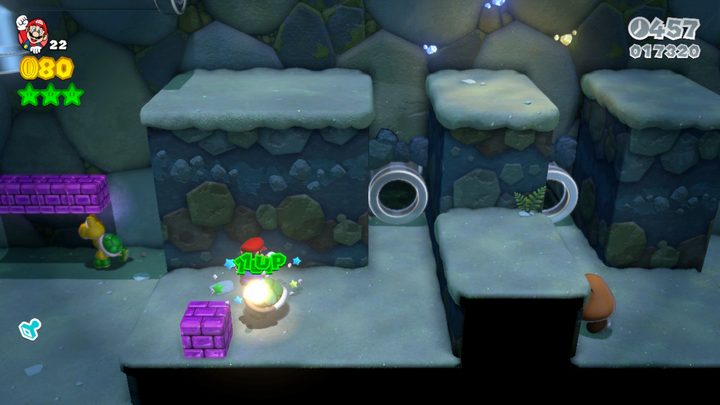
Next, we’ll show you how to get unlimited lives in Super Mario 3D World, and it’s actually quite simple. What you need to do is continuously jump on a turtle shell over and over, which will grant you an additional life each time you land on top. To get this set up, we recommend booting up World 1-2, Koopa Troopa Cave. From the start of the level, head down through the warp pipe and you’ll appear inside the cave.
Then, make your way through the transparent pipe, up to the second floor to reach a Koopa Troopa. Stomp on it, grab its shell, and take it just below to where the Goomba is. Next to the Goomba are a few purple blocks. Take out the Goomba, then line yourself up to face the wall opposite the purple blocks. Let the shell go, and if you’re positioned correctly, it will continuously move between the two walls back and forth.
All you need to do at this point is jump on top of the shell. Once you do, your character will keep jumping automatically, and each jump nets you an extra life. Keep in mind, there are multiple spots to execute this trick, but this is one of the earliest locations — making it easy to get stacked up on lives right away.
How to unlock Luigi Bros.
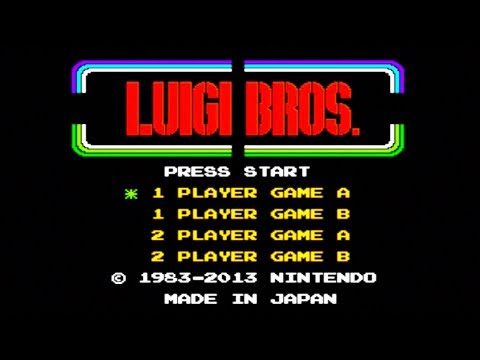
Finally, we’ll cover how to unlock Luigi Bros., a playable version of the original Mario Bros. but with Luigi characters instead. That’s right, Super Mario 3D World gives you access to the entirety of Luigi Bros., and unlocking it is a fairly straightforward task.
All you need to do is complete the main Super Mario 3D World game — much like you would when unlocking Rosalina. After you roll credits, you’ll come back to the main menu. This time, you might notice the main screen is a little different. In the bottom left, you’ll see an 8-bit Luigi character. Press the minus (–) button on your controller, and once you do, you’ll get a notice that reads “Do you want to play Luigi Bros., the Luigi version of the classic Mario Bros. arcade game?”
Select Play, and you’ll be taken to the Luigi Bros. home screen. You can play the game with up to two players locally. And with that, you’ll be able to start playing the classic 8-bit adventure right from Super Mario 3D World.