
How to optimize Windows 11 and Windows 10 for gaming
Windows is the place to be for PC gamers, but it's not perfect for gaming out of the box. Here's how to optimize your Windows 11 laptop or desktop for gaming.
Here’s how much RAM Windows 11 actually uses
Windows 11 may use more RAM than Windows 10, but how much is it exactly? We'll tell you everything you need to know about Windows 11 RAM usage.

There are two versions of Windows 11. Here’s how to decide between them
Wondering which version of Windows 11 you need? We’ll walk you through a comparison of Windows 11 Pro and Windows 11 Home so that you can decide.

How to factory reset an HP laptop to start fresh or for resale
Does your HP laptop require a dreaded factory reset? Fortunately, this isn’t too complicated of a process, and our guide should be a big help!

How to connect a wireless mouse to a laptop
You can connect a wireless mouse to your laptop with its bespoke USB receiver or by using Bluetooth -- or both! Here's how to do it.

How to check your laptop battery health
You can generate a Windows battery report to see how healthy your laptop battery is.

Windows 11 24H2: Here’s the big update that’s coming soon
There might not be a Windows 12 release this year, but its features might come to Windows 11. Here's what we know so far.

What is the BIOS and how to use it
The BIOS or UEFI is an interface you can use to examine core settings on your PC and make important boot changes. Here's how to access it and what you can do.

How to test RAM: troubleshooting to find bad RAM
RAM is one of the key components of any computer. If you're diagnosing a problem with your PC, it's a good idea to check your RAM.

How to show hidden files in Windows
If you've hidden certain files away, they aren't lost. Here's how to show hidden files so you can more easily interact with them again.
Which operating system is safest to use?
Windows, macOS, Chrome OS, Linux -- which is the safest to use? Each have their strengths and weaknesses. Here's what we think is the most secure.

Windows 10 end-of-life: Here’s when you’ll be forced to upgrade and what to do
Windows 10 is officially reaching its end of life in 2025. If you haven't upgraded to Windows 11 yet, here's what you need to do to be ready.

How to get Microsoft Office for free
Microsoft Office can be expensive, but it doesn't have to be. Here's how to get Microsoft Office for free, using trials and student discounts.
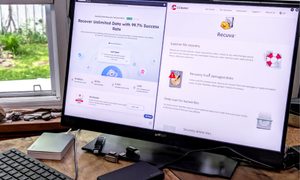
I tested two of the best data recovery services. Here’s which to use
This hands-on comparison of EaseUS Data Recovery Wizard Pro and Recuva Professional reveals which is the best file restoration app for you.

How to install Android apps on Windows 11
Windows 11 supports Android apps through the Amazon Appstore, but getting everything set up is tricky. Here's how to install Android apps on Windows 11.

Can you use Control-Alt-Delete on a Mac? Here’s the answer
Wondering if there’s a Control-Alt-Delete shortcut in macOS? Our guide has the answer, with everything you need to know about using this shortcut on your Mac.

How to hide the taskbar in Windows
If you need to learn how to hide the taskbar in Windows, it's easier than you might think. In just a few clicks, you can make it vanish. Here's how to do it.

How to build a PC from scratch: A beginner’s guide
Building a computer might seem intimidating, but DIY PC building can be a lot of fun. And with a little help, anyone can do it. Here's how.

How to check what motherboard you have in two easy steps
Checking your motherboard model isn't hard to do, but it's not as intuitive as other components. Here's how to find out.

How to choose between a MacBook and a Windows laptop
The MacBooks versus Windows laptops debate has been raging for decades, but never has it been this intense or important.

How to block a website
Need to learn how to block a particular website from your kids? Here are multiple ways to do so, using both first- and third-party software on Windows and Macs.

How to sail solo in Sea of Thieves
Looking to sail the ocean blue in Sea of Thieves, but don't want to assemble a ramshackle crew of scoundrels? These tips will help you best other crews alone.

How to dual boot Linux and Windows
Dual booting Linux and Windows is simple, and in this guide, we'll walk you through how to do it on your PC step-by-step.

How to convert FLAC to MP3 on Mac, Windows, and web
Converting FLAC to MP3 is pretty straightforward, but doing so is going to affect the quality of the latter. Here’s a guide on how to go from A to B.

How to delete Google Chrome on Windows and Mac
Sick of using Google Chrome as your default web browser? Here’s how to delete it from Windows 11, Windows 10, and macOS.
How to change your IP address on Mac and Windows
Changing your computer’s IP address isn’t complicated, but it involves more than a single step. Here’s how to do change your address in both Windows and MacOS.

How to use iMessage on Windows
Apple's iMessage chat app might be an Apple exclusive, but that doesn't mean you can't use it on Windows. Here's how to do it.

Here’s how to unlock a keyboard that’s locked
A locked keyboard can be a major inconvenience as we rely on keyboards to operate our PCs and laptops. Here's a guide to how to unlock a keyboard that's locked.

How to resize an image on Mac, Windows, and a Chromebook
Whether you need to scale an image up or down, or change the aspect ratio, our guide covers how to resize images for Windows, macOS, and ChromeOS.

How to sync files and folders to OneDrive
Microsoft OneDrive is an excellent cloud storage platform with numerous Windows and Microsoft 365 integrations. Here’s how to sync your files and folders.

How to take a screenshot using a Microsoft Surface
Our comprehensive guide will help you take screenshots on your Microsoft Surface device in no time, whether you have a new model or something older.

How to record your screen on Mac, Windows, and Chromebook
Need to record your computer screen for a project or to share gaming fun with friends? Here's how to do it on different platforms via various apps and tools.

How to install Windows on a Steam Deck
You can run Windows on a Steam Deck, but the process is a little involved. Here's how to install Windows 11 or 10 on your Steam Deck and fix common erros.
Here’s how to combine PDF files the easy way
No matter your operating system, knowing how to combine PDF files is a good skill. We'll teach you the best ways to do so for Windows, macOS, or via the web.