
 If you’re not all that excited about Google’s Project Glass, then you may change your mind after seeing the company’s latest promotional video, entitled How it Feels [Through Glass]. The two minute film takes us not only through some of the situations where Glass is at its most exciting, but also the voice commands we’ll need to use in order for it to do our bidding.
By saying, “OK Glass,” users can access a series of sub commands, then say what they want to do, such as take a picture, record a video, start a Google Hangout or fire up the GPS system. As the video progresses, you can see Glass project Google Now style alerts for the weather, information on flight times and their status, Google and Wikipedia searches, instant messaging and even audible translations of basic phrases into a local language.
While the video does employ the time-tested sales method of buy-this-product-get-this-lifestyle, Glass still looks helpful and fun for those of us who don’t go skydiving/skiing/ballet dancing every weekend. To accompany the video’s release, Google has also created a new website dedicated to Project Glass, which goes through some of the operations seen in the video and for the first time, gives us a really good look at the hardware.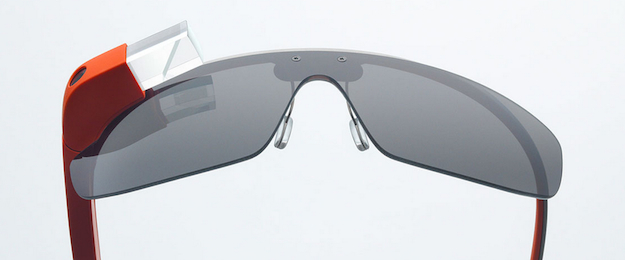
The frame is strong enough to be twisted and light enough that it shouldn’t be a burden, plus a new image shows it can be attached to its own sunglass lenses. We’re also treated to an overhead view which highlights the enclosure running down the right-hand arm of the frame. Google Glass will be available in five colors: Sky, Charcoal, Tangerine, Cotton and Shale.
Until now, the only people who could get their hands on a Glass prototype were the developers who signed up for the Explorer Edition at last year’s Google I/O event. However, Google has started a promotion where a select few people will win the chance to spend $1500 (plus the tax) on their own Explorer Edition Glasses. All you have to do is convince Google you’re the person for the job, something which has to be done in less than 50 words, with a picture or two, through Google+ or Twitter. Sadly for budding international Explorers, like the Google I/O offer, it’s only open to U.S. residents.
Google Glass still doesn’t have an official release date, although sometime in 2014 is expected, but the project is moving on at a considerable pace, particularly following the recent Glass Foundry events, where Google says developers came up with more than 80 new ways to use Glass. As to what these ways are, we haven’t been told, but more details could come during this year’s Google I/O conference in May.


